 GPSLogger II
An App-Project that started as small & simple hobby (in early 2009) has developed into an All-In-One solution in a period of more than 10 years.
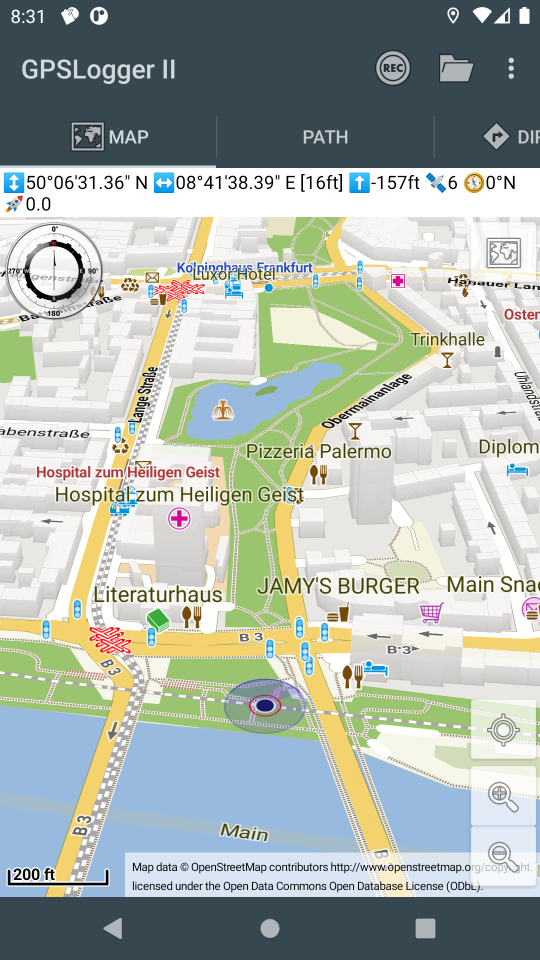
GPSLogger II does what you can guess quite simple by its ordinary name. The application can record the physical movement of your Android Device over time. What you probably might not be able to guess are the additional features GPSLogger can offer to you.
But before going into further details - location information is very sensitive information - nobody excepts you should know where you are (or where you have been). GPSLogger II is fully respecting your privacy. All data the app is recording will remain on the device only and you are the only person who decides what is going to happen with your data. As Developer of the app I do all I can in order to be as transparent as possible what the app is doing.
If you have any questions - please do not hesitate to ask!
Every permission the app is requesting will hopefully be explained in a reasonable manner. If you have any doubts, please deny the app request. In such a case, please open the Permissions section of the GPSLogger manual that can be found at https://www.emacberry.com/gpsl/app-permissions.html and read more details about the permission requests. Only grant the permission if you feel comfortable to do so.
The list of application features is quite long, and it is impossible to describe in detail all the functionalities here in the overview. You can find a detailed description of every aspect in the GPSLogger II manual that is located at https://www.emacberry.com/gpsl/manual.html.
If you have any remarks or suggestions for improvements (yes - more features!) - I am very happy to hear from you.
Main Application Features
- Your privacy drives everything
- Build in 18 different Default Views + 4 fully customizable Multi-Views
- Supporting imperial (feet or yard), metric or nautical units.
- Designed to be Battery friendly
- Data is stored ‘as it is’
- Recording with a resolution of one millisecond
- Build in BTLE Beacon Scanner
- Logging GPS (incl. NMEA), Magnetic & Barometer Sensor Data
- Supporting additional external Bluetooth & ANT+ Sensor
- Pulse / Heart rate
- Cycling Cadence
- Cycling Power Meter
- Shifting information (Shimano Di2)
- Bluetooth-FTMS Treadmill (supporting speed & incline control)
- Concept2 and other Bluetooth-FTMS Indoor Rower
- Integrated Maps & Routing functionalities
- Extended Functions (all for free)
- Backup & Restore of all Data & Settings
- Multiple Export formats (incl. GPX, KML, FIT or JSON)
- Sharing your activities with others when you feel comfortable to do so
One final remark: As you notice the list of functionalities is quite long. Since each function can also be adjusted to your personal preferences, the application settings list is really long and can look very complex for the start. There are over 400 different settings you can adjust. The GPSLogger Manual will guide you through the different settings sections that can be adjusted for a specific feature.
Download
via Google Play

https://play.google.com/store/apps/details?id=com.emacberry.gpslogger
Download via F-Droid
You need to add a custom repository in order to be able to install GPSLogger II All details can be found in the short F-Droid Tutorial - Thanks Johann!

https://f-droid.org/packages/com.emacberry.gpslogger
via amazon appstore
Recommended for BlackBerry 10 Users (yes the app will still work on your BlackBerry 10 device)!

https://www.amazon.com/gp/product/B00L9GLGGQ
My personal GPSLogger Use Cases
Why GPSLogger is build in the way it is?
I truly believe that you should use the software that you build by yourself on a daily basis. Actually I started with the app because on the Blackberry Platform there was nothing that I wanted (in the year 2009) - so I began with my own solution. When RIM decided to drop the Java based platform (and moved over to BlackBerry OS10 (the beginning of the end), I moved over to Android. There has been plenty of other apps available already, but you might guess it, none of them offered the features I wanted to have (or I simply did not searched hard enough). GPSLogger for Android was released in Aug. 2016 for the first time via Google Play Store.
Please find below my four main use cases, with a brief feature list. You will find detailed descriptions about each of the functionalities in the corresponding manual sections. Of course this are just my personal use cases - you can use it for much more - there is plenty of feedback what users do with GPSLogger and I would be very happy to hear form your use cases too!
Primary
Automated logging of my casual road bike cycle activities following a planed route (including multiple climbs) or just keep track of the commute sessions using:
- AutoSTART when I am leaving home/work
- Make use of the Barometer Sensor to capture realistic elevation profiles
- Recording additionally to my position my heart rate, cadence, left & right power and shifting events
- Using OFFLINE OpenStreetMap data (*.map files)
- Announcements of Turn Instructions and upcoming climbs
- Interval Text to speech announcements for total distance, total time, sector time, average speed and remaining distance and climb-meters every 5 km
- Automatically switch to ClimbView when approaching a climb on my route
- Requesting “when and what’s the next turn” via my Di2
- Enjoying real MSL elevation information
- Keep my wife happy by letting her know where I am (when my ride takes longer then 2 hours)
- Controlling via my Di2 shifting levers the playback of my music I am sometimes listening (on my bone conduction headphones)
- In case of a closed/blocked street: using the detour functionality
- Intense usage of the ShutUp function
- When I am cycling alone: capture BTLE Beacons
- AutoSTOP when arriving at home/work
- Text to Speech Summary
- AutoUpload to Strava
Secondary
Automated logging my local hiking activities - quickly change the profile to ‘hiking’ & enjoying functionalities:
- AutoSTART when I am leaving home
- Make use of the Barometer Sensor to capture realistic elevation profiles
- Using OFFLINE OpenStreetMap data (*.map files)
- Interval Text to speech announcements for sector time & average speed every kilometer
- When I am walking alone: capture BTLE Beacons
- AutoSTOP when I am arriving at home
- Text to Speech Summary
- AutoUpload to Strava From time to time I also use the navigation features when hiking
Tertiary
Manual Indoor-Run or Indoor-Rowing Sessions - quickly change to the corresponding profile and use:
- Simulate the run of any real-outdoor route
- Interval Text to speech announcements for sector time & average speed every kilometer
- Text to Speech Summary
- AutoUpload to Strava
Quaternary
Manual logging of flights (when it was possible to travel) or long travel by train or car (obviously also with a different profile) and enjoy:
- Make use of the Barometer Sensor to capture realistic elevation profiles
- Using OFFLINE OpenStreetMap data (*.map files)
- NO AutoUpload to Strava because I am exceeding the maximum average speed
Since I mentioned it already multiple times - If you like you can follow me on Strava.
Other sample use cases from GPSLogger Users around the world
- Bike Computer replacement
- Motorcycle touring
- Off-road buggy & quad rides
- Safari Tours
- Sailing Regattas
- Skydiving
- RC-Car tracking
- Racetrack Timekeeping
- Video Capturing of Routes
History - Initial BlackBerry Version
For what ever reason I could not throw it all over board
THIS INFORMATION IS OUTDATED
GPSLogger II is a pretty straightforward application – it records your physical movement on your BlackBerry® device over time. The recorded information includes, beside your actual location data in WGS84, the elevation, your speed and some additional data. You can select between imperial, metric or nautical units.
The location information can be displayed on a plain canvas or GPSLogger II can make use of BlackBerryMaps (if installed) to display your movement on a map. Please note when you make use of BlackBerry Maps that this can imply additional data charges.
Additionally, GPSLogger II can direct you to a location that you either entered manually or have previously recorded ( via the “Guide Me Home” function). This can be quite useful whether you want to locate your car in a big parking lot or you are in the wilderness and have lost your orientation.
As extended functionality to the “Guide Me Home” feature a very easy to use outdoor navigation is integrated into GPSLogger II also. As latest addon you can use GPSLogger II also as LapTimer - a very powerful feature for all who need to keep track of intermediate timings.
The most important aspect of GPSLogger II is that it will work 100% offline - no data will be transferred while you use it (except when the BlackBerryMap view is used).
Features
- Record your movement over time - the following values will be stored:
- longitude / latitude
- accuracy for longitude & latitude values
- # of satellites
- current altitude (in WGS84)
- current course/heading
- current speed
- name of location (if specified)
- Display of the current data in various views:
- Path View: Displays the traveled path in an x/y coordinate system (2D-View) 1
- Elevation View: Displays the change of altitude over time 1
- Speed View: Displays the change of speed over time 1
- GPS View: Displays longitude, latitude, heading and speed in a large font (e.g. for your own navigation)
- Timing View: Displays elapsed time, current speed and Ø speed in a large font (e.g. for runners and cyclists) 1
- Compass View: Displays the current heading in a nice compass view 2 3 4
- Direction View: Shows an arrow/line that points into the direction of stored location (according to your current heading) 3 5 6 4
- Outdoor navigation (incl. ETA) -> see documentation for details
- “Guide me Home”-Function for people who easily loose orientation like myself ;-) (see ‘Direction View’) To reach the destination you have stored, travel in the direction of the arrow on the device. If the arrow is pointing up, you are traveling in the correct direction to reach your selected destination. If the arrow is pointing down, you are traveling away from the selected destination. This makes GPSLogger II also suitable for Geocaching! 3 5 6 4
- Lap Timer functionality
- Zoom IN & Zoom OUT for path, elevation and speed views
- “Distance Alerts/Signal” - the device can peep & vibrate after a user-specified distance (in meters or feet) was traveled (especially useful for runners & bikers)
- Night Mode in 4 different colors (yellow, blue, red and green)
- Save current location to use it later with the “Guide me…“-Function
- Store current location on the Clipboard (e.g. to paste it into an SMS or eMail)
- Support for wildlife tracking/recording (with the option to select from predefined location names)
- Load and display a previously recorded path
- Summarize information about a previously recorded path
- Export recorded paths into CSV, GPX, KML (GoogleEarth) formats (and send it via email if you wish)
- Import a path in GPX or KML format (e.g. that are recorded with other applications that support GPX-Export or have been downloaded from websites like GPSies.com 7
Reviews (of the initial BlackBerry Version)
Ryan Blundell 2009/06/02 [from http://www.crackberry.com]
GPSLogger - a Free BlackBerry App to Track your Movement
GPSLogger is a free application that essentially enables you to help you get where you are going and track where you have been. The application will also help you remember places that you have visited; perhaps a new hang out or a location of a movie set you accidentally stumbled upon. Now, hopefully you don’t get lost on the way to the rest of the review.
Destination: the conclusion An amazing array of features, numerous log and file options, multiple ways to view the information. All this and more can be found in this FREE app. I was thoroughly impressed with GPSLogger’s offerings.
Ronen Halevy 2009/03/13 [from http://www.berryreview.com]
GPSLogger – Free App Records Your Movements Using GPS (GPX Or KML)
Emacf1 released another free/donationware application recently called GPSLogger. It is a simple offline GPS logging application that records your movements using GPS. The nice part is that unlike other applications it stores it on your BlackBerry, so it does not have an online component. This appeals to my security conscious side that just wants to track my trip or hike without sharing…
-
requires that the devices is actually logging (this means a path will be recorded) ↩ ↩2 ↩3 ↩4
-
only available for BlackBerry® devices with OS4.6 or higher (SVG-support required) ↩
-
since BlackBerry® devices (before OS7.x) come without a compass, this function requires that you move around so the current heading can be calculated from the GPS data ↩ ↩2 ↩3
-
thanks to Rob Antonishen for the very nice compass SVG file ↩ ↩2 ↩3
-
requires that you have loaded a previously saved location
or
when logging, this function will always guide you into the direction of the first recorded location of your current path (your start location) ↩ ↩2
-
this function is not a navigation replacement - you will be guided into the direction of a previously stored location. It does not take natural barriers like rivers or canyons into account. ↩ ↩2
-
minimal requirements for a location stored in the GPX file are: longitude, latitude, and timestamp information ↩